This Fake "iCloud Verification" Email Tries to Steal Your Apple ID
Convincing message leads to a realistic fake Apple sign-in page designed to capture your credentials

tl;dr
A phishing email claiming you must “complete your iCloud verification” to avoid losing access to Apple services is hitting inboxes. The message links to a fake Apple login page that captures your Apple ID and password. Even if you enter the correct details, the site may display a “wrong password” error to encourage repeated attempts and harvest your information. Do not click the link. Go directly to Apple’s official website if you need to check your account.
Overview
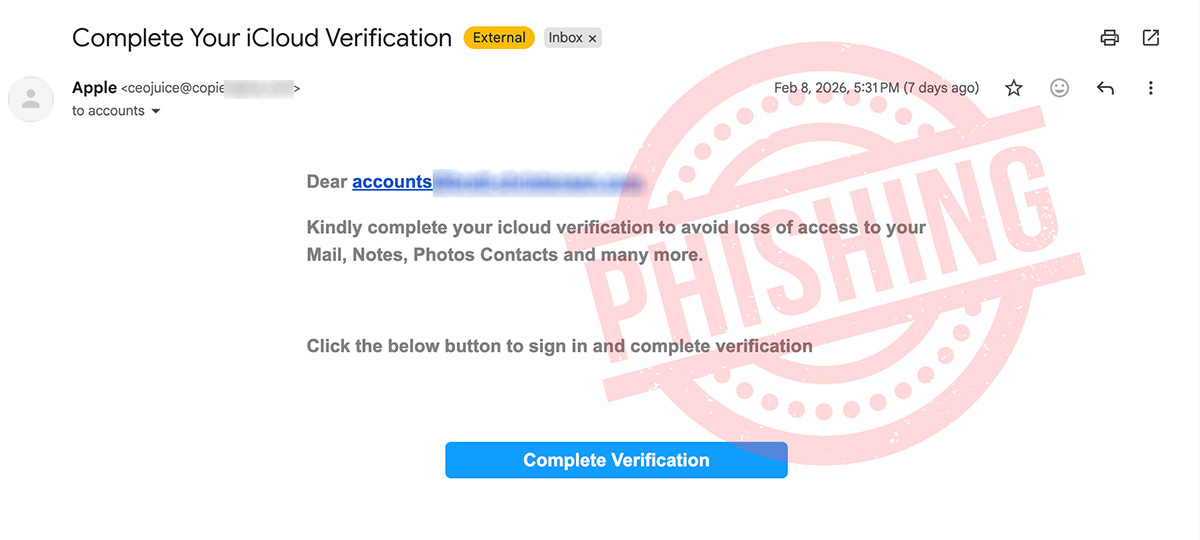
Criminals are currently distributing a phishing email that claims your iCloud account must be verified. Supposedly, if you don’t verify as instructed, you risk losing access to important Apple services such as Mail, Photos, Contacts and more.
The message is designed to create urgency and push recipients into clicking a link without due forethought.
At first glance, the message may look official, especially to people who rely heavily on their Apple devices and services. But there are several red flags indicating that this is not a genuine Apple communication.
How the scam works
Clicking the “Complete Verification” button does not take you to Apple’s website. Instead, it leads to a sophisticated phishing site that is a virtual clone of the genuine Apple login page.
In the example I received, the link first displayed a “verify you are human” page, then rapidly and automatically redirected through several sites before finally loading the fake Apple login page.
Once on the bogus site, victims are prompted to enter their Apple ID and password. If credentials are entered, the page displays an error message claiming the password is incorrect, regardless of what is entered.
This tactic serves a purpose. The site is not trying to log you in. It is trying to collect your details. Showing an error encourages victims to try again, confirming the information they just provided. Some versions of these scams may then ask for additional details such as phone numbers, date of birth, or payment information, ostensibly because your login supposedly failed.
Red flags in the email
There are several clues that this message is fraudulent:
• The sender address is not from Apple.
• The greeting is generic and impersonal.
• The wording is awkward and poorly structured.
• It creates urgency by warning that access to services may be lost.
• It pushes you to click a button rather than directing you to Apple’s official website.
Apple does not send emails asking you to verify your account through random links, especially using third-party websites.
Why scammers target Apple IDs
Apple accounts are a valuable target for criminals. Gaining access to an Apple ID could allow an attacker to:
• Access photos, files, and backups
• View contacts and email data
• Make purchases using saved payment details
• Lock the real owner out of their account
• Use the account in further scams
Because so many people rely on iCloud for everyday tasks, warnings about losing access can be very effective at triggering panic.
What to do if you receive an email like this one
There are many variations of these phishing emails. If you receive a message like this:
• Do not click any links or download any attachments
• Delete the email
• If you are concerned about your account, go directly to Apple’s official website and sign in there
Never use links in unsolicited emails to log into important accounts.
If you already entered your details
If you clicked the link and entered your Apple ID and password, act quickly:
• Change your Apple ID password immediately
• Turn on two-factor authentication if it is not already enabled
• Review your account for unfamiliar devices or activity
• Check for unexpected purchases or changes
Taking prompt action can help reduce the risk of account takeover.
Scammers regularly impersonate high-profile brands like Apple because such companies have very large customer bases and, therefore, many potential victims. Moreover, people are more likely to trust messages that appear to come from well-known companies.
Staying alert to the warning signs can help you avoid handing over sensitive information to criminals.
A screenshot of the scam email: